

Reduce your personal email inbox clutter and gain clarity by reviewing just 10 emails. Here’s how to start systemically using the decision questions to keep what matters and unsubscribe from the rest.
Estimated reading time: 5 minutes
Do you often subscribe to something interesting, only to never read it again? I do. Over time, those emails pile up and your personal inbox becomes overwhelming. You tell yourself, “What if I need this one day?”, so you keep everything.
An email inbox reset is a quick pause to decide what still deserves your attention, and the space in your inbox. It’s not a full clean-up; it’s just a start to a small reset.
Why try an email inbox reset?
When your inbox is full of things you do not need or read, it adds mental weight to you without you realising it. Should I open it? Should I delete it? I click in and suddenly feel judged for being a couch potato or for not following any of those tips. (Yes, I’m rather hypersensitive this way, so learning to let go is my biggest goal this year.)
Most of the time, these emails are not urgent, important or necessary. They are just sitting there.
This reset helps you manage email subscriptions more intentionally and reduce email clutter without feeling overwhelmed. As Cal Newport writes in the book Digital Minimalism, we should use technology intentionally, reduce unnecessary digital noise and focus on what matters most. This, in my view, includes how we use email. We should choose when it deserves our attention rather than letting it pull us in different directions.
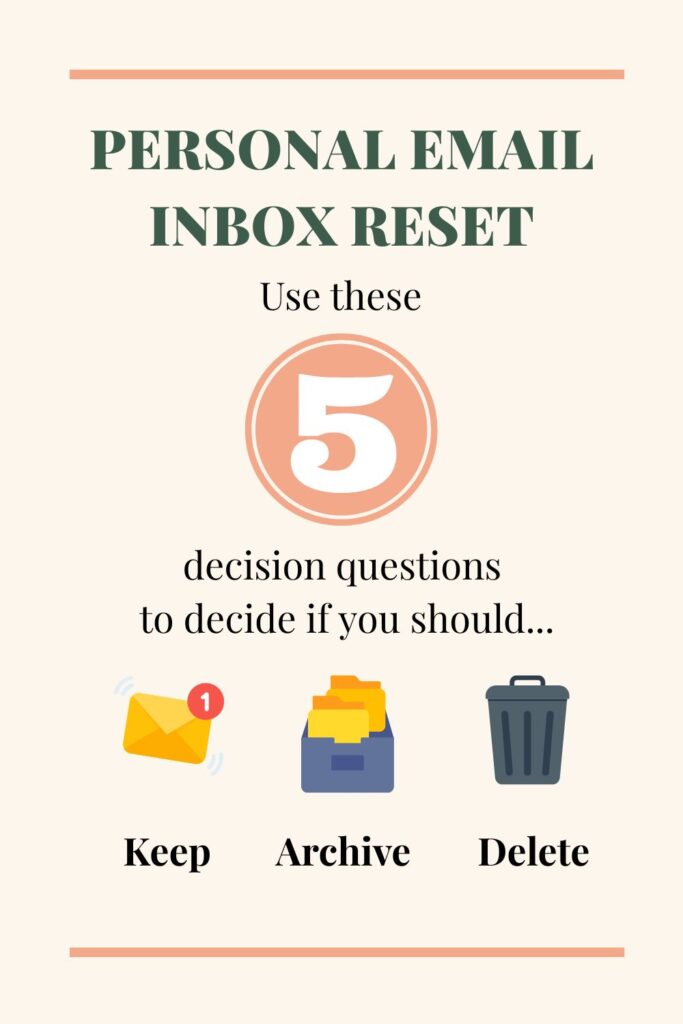
How to reset your inbox using just 10 emails
Set aside about 30 minutes. Look at the top 10 emails in your personal inbox and ask yourself:
- Have I opened an email from this sender in the last month or week?
- Is this information still relevant to my current life stage?
- Will I realistically take action on future emails from this sender?
- Does this sender support something I genuinely care about?
- If this email disappeared tomorrow, would I even notice?
If the answer is “yes” to any of these, that’s great! The email should be kept.
If the answer is “no” to all of them, delete the emails and unsubscribe.
Sometimes, it is not straightforward. Some emails sit somewhere between yes and no, a “maybe”. For example,
- If the email contains information that you do not need now but may need to reference in the future, such as membership details or a warranty, archive it.
- If the email contains information that you only need temporarily, such as a purchase confirmation, archive it in a folder called ‘Delete Monthly’. Then delete those emails at the end of the month.
Try using this decision tree to help you decide.
How do I unsubscribe in Gmail and Outlook?
Unsubscribing and mass deleting emails from sender is straightforward. Here’s the unsubscribe emails guide:
Gmail:
- Open the email and click Unsubscribe near the sender’s name or at the bottom of the message. Here’s the guide to unsubscribe via a computer and via a phone.
- Then, right-click the sender’s email address and select ‘Find emails from sender’. Delete all emails.
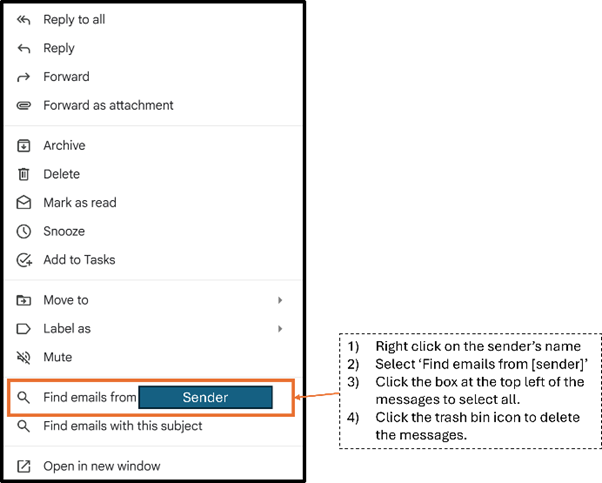
Note: Gmail has also recently introduced a feature that allows you to manage all your active email subscriptions in one place. Here’s how.
That said, I would still recommend you run through the decision questions above for a more intentional reset. It encourages clearer thinking and helps you better understand what you actually want at this stage of your life.
Outlook:
- Open the email and click Unsubscribe or manage it through Manage subscriptions in your settings. Here’s the guide.
- Then, right-click the sender’s email address and select ‘Find Related > Messages from Sender’. Delete all emails.
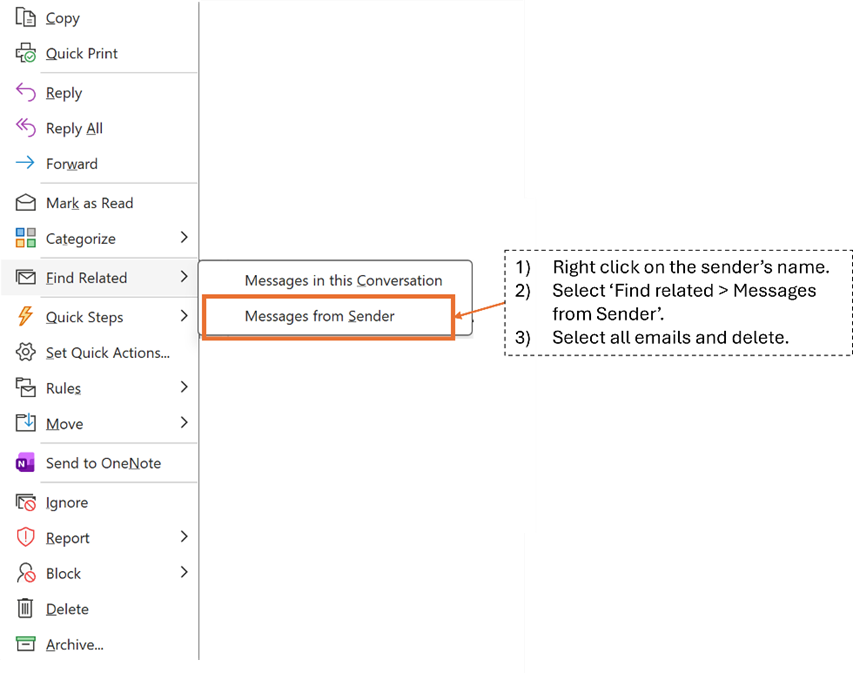
Do not be scared or worried. Know this, if you have not read their emails in the past month, you are unlikely to read them in the next few months or even the next year. And…you can always subscribe again if it becomes useful at a later stage of your life.
Intentionally Managing Your Personal Inbox Is Liberating
I was apprehensive at first. What could I really achieve from this? Maybe a slightly less cluttered inbox? Still, it was only 30 minutes of my time (and 30 minutes less doom scrolling), so why not?
I reviewed my top 10 emails and went through the decision questions step by step, making a conscious effort not to skip any. At first, I was worried about missing out if I unsubscribed and deleted the emails. But by the seventh email, I felt much clearer about what I want and need.
One subscription dated back to when I was pregnant and looking for pregnancy tips. I am well past that stage now, so it was no longer useful. There were also weekly emails sharing weekend activities. When I paused to think, how often did I rely on those emails to decide what to do? Almost never. I usually do a quick online search or get my inspiration from social media instead. So off they went.
Then there were the educational ones. Those with the bite-sized content I genuinely open and read. Those, I kept.
Within 30 minutes, I had unsubscribed from six senders. That was almost 300 emails gone. But more than the number, it was the clarity. I realised I want content that helps me grow and develop as a person. The rest? They were for spontaneous moments that a quick search could easily solve.
Now, opening my inbox feels calmer and liberating. I am no longer greeted by things I do not need, only those that genuinely support where I am now.
Try this once. See how it feels. If it helps, repeat it a few more times until the top 10 emails are only those you truly need.
Note: Some of the links in this post are affiliate links, which means I may earn a small commission if you decide to make a purchase. There is no additional cost to you. It helps support this blog and allows me to continue creating helpful content. Thank you for supporting my work.